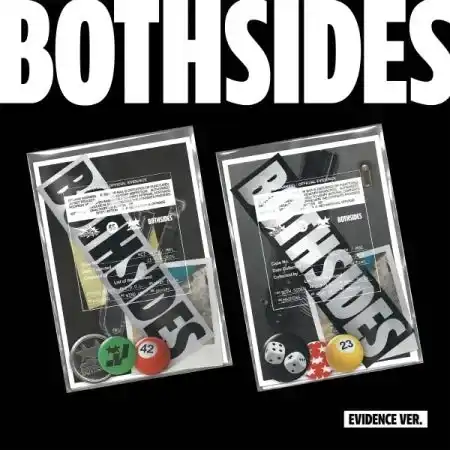
1 / 2
NCT JNJM - [Both Sides] 1st Mini Evidence Smart Album
Release Date: February 24, 2026
Inclusions (per version)
WHITE Version
- Envelope: 1 type
- ID Card (QR): 1 card, random out of 2 types
- Postcards: 2
- Badges: 3
- Sticker: 1
- Polaroids: 3 (common to all versions)
- Photocard (JENO): random 1 of 3 types
- Photocard (JAEMIN): random 1 of 3 types
BLACK Version
- Envelope: 1 type
- ID Card (QR): 2 cards
- Postcards: 2
- Badges: 3
- Sticker: 1
- Polaroids: 3 (common to all versions)
- Photocard (JENO): random 1 of 3 types
- Photocard (JAEMIN): random 1 of 3 types
Note: Random components are distributed with equal probability.
Track List
- BOTH SIDES (Title)
- I.D.O.L.
- What It Is
- HASHTAG
- WIND UP
- sexier
QR Card (Nemoz) Guide
- Install the Nemoz app from the Play Store or App Store.
- Sign up and verify your email (check your spam folder if needed).
- After verification, tap “Complete Verification” in the app to log in automatically.
- Tap the “+” button at the top of the app and scan the QR code.
- Tap the check button to register the album to your account.
- Access the album’s multilingual content freely.
- Alternatively, after logging into the Nemoz app, scan the QR with your phone camera to register instantly.
For more details, visit help.nemoz.io.
Select Version
From $7.31
Original: $20.90
-65%NCT JNJM - [Both Sides] 1st Mini Evidence Smart Album—
$20.90
$7.31Product Information
Product Information
Shipping & Returns
Shipping & Returns
Description
Release Date: February 24, 2026
Inclusions (per version)
WHITE Version
- Envelope: 1 type
- ID Card (QR): 1 card, random out of 2 types
- Postcards: 2
- Badges: 3
- Sticker: 1
- Polaroids: 3 (common to all versions)
- Photocard (JENO): random 1 of 3 types
- Photocard (JAEMIN): random 1 of 3 types
BLACK Version
- Envelope: 1 type
- ID Card (QR): 2 cards
- Postcards: 2
- Badges: 3
- Sticker: 1
- Polaroids: 3 (common to all versions)
- Photocard (JENO): random 1 of 3 types
- Photocard (JAEMIN): random 1 of 3 types
Note: Random components are distributed with equal probability.
Track List
- BOTH SIDES (Title)
- I.D.O.L.
- What It Is
- HASHTAG
- WIND UP
- sexier
QR Card (Nemoz) Guide
- Install the Nemoz app from the Play Store or App Store.
- Sign up and verify your email (check your spam folder if needed).
- After verification, tap “Complete Verification” in the app to log in automatically.
- Tap the “+” button at the top of the app and scan the QR code.
- Tap the check button to register the album to your account.
- Access the album’s multilingual content freely.
- Alternatively, after logging into the Nemoz app, scan the QR with your phone camera to register instantly.
For more details, visit help.nemoz.io.